Auction Insights: Benchmark & Beat Your Google Ad Competitors
Auction Insights is the key that unlocks so much online advertising awareness. You just need to know how and when to turn it…
With it – you’ll be able to answer questions such as “who’s bidding on my brand” and “how much are my competitors spending on this keyword”.

But it’s more than that.
Are you seeing a dip in impression share? Ad spend zig-zagging like crazy? Or CPCs taking a turn for the worse? Who’s keeping you up at night? Which competitors are actually using Google Ads?
All of which can be answered with relative ease.
One of the first things you should do is take a good, hard look at your competitors. But not their websites, but inside Google Ads itself. 🔎
You can see if competitors are hurting your performance.
Auction Insights are built into Google Ads. That means there’s no need to worry about unreliable data or third-party software that may (or may not) work.
In the next 8 minutes I’ll guide you through a competitor fuelled fix. Find out how to navigate Auction Insights and get the clearest conclusions from your data.
I’ll also share with you my “1-inch competitor brand punch” – great power, in a small package.
*ahum*
On This Page
That’s the table of contents.
Now, let’s dig deeper:
What is Google’s Auction Insights Report?
Available for both Google Search and Google Shopping campaigns, Auction Insights is a reporting system that shows competitor ad participation against your own. And how often their ads appear compared to yours.
That’s because every time someone searches on Google, Google performs an ad auction. This happens behind the scenes to figure out which ads to serve and where in the rankings each ad appears.
Then a day later, Google can pass how often your ads show up in search and where your ads rank with your competitors.
The many benefits of Auction Insights
Unlike doge coin, Auction Insights has actual value (sorry hodlrs).👐
You can:
- Find out who your real competitors are on Google Ads. The competitors that display may actually surprise you.
- Discover how often competitors bid on an ad. Did they just start or do they pause during the weekends?
- Also, do they spend more on a certain day of the week? You can drill down by segmenting by Time ➡️ Day of Week.
- See what device competitors choose to target. For example, one of your competitors could have a top-of-page rate on mobile and you need to investigate why.
- Sniff out which of your important keywords other brands are investing the most in.
The Auction Insights Metrics
From these reports, you can see how you and your competitors’ advertising performance stack up.
Auction Insights isn’t a pot of gold. It doesn’t show the quality score, bids, or campaign setup of your competitors.
Instead, you need to be able to read between the lines.
In Google search and shop campaigns you can see:
Impression share
Impression Share is the total impressions you received divided by the number of impressions you were eligible to get.
Let’s say your impression share for an ad is 30%, that means your ad showed 30% of the times it could potentially appear.
Take the example below:
Competitor A has a 38.28% impression share. Our impression share is 61.42%. That means our ad was shown 6 out of 10 times, against theirs at 4 out of 10 times.

Pro-tip: how much is your competitor spending on ads?
When reviewing competitors’ impression share, you can use it as a rough guide to how much they are spending.
For example, if they have 38% impression share against your 61% and your daily spend is $500. You can hypothesise – all things being similar – they’re spending around $300-320 per day.
Note: if an impression share is less than 10%, it is not reported.
Overlap rate
Overlap rate shows the percent of times a competitor’s ad placed an impression at the same time your ad also had an impression.
A high overlap rate (50% or more) shows you and your competitor have similar targeting, such as keywords. It might also hint at a similar budget and bid too.
In search campaigns, you’ll also be to review in Auction Insights reporting these data points:
Position above rate
When both of your ads were shown at the same time, this is how often another advertiser’s ad is shown in a higher position than yours.
Seeing 20% for a competitor’s position above rate? They have an ad appearing higher than yours 20% of the time, when both ads appeared.
You might infer that a high ‘position above rate’ represents your campaigns being both setup and running well. And conversely, identify competitors doing ‘better’ than you.
Top-of-the-page rate
Top-of-the-page rate shows how often an ad appears above organic search results.
Your top-of-the-page and competitors’ rate appear in separate columns.
Tip: both columns can be handy to compare with their overlap rate and absolute top-of-the-page rate to see how often they are getting the best of you.
Absolute top-of-the-page rate
An important metric to regularly review in Auction Insights.
Absolute top-of-the-page rate is the amount (as a percentage) of ad impressions that appear at the very top.
Again, above the organic search results and also any other ads. This is position 1.
Tip: you can gauge your bid and quality score compared to competitors with a high % rate.
Outranking share
Outranking share shows how often your ad outranked a competitor’s or showed when their ad didn’t at all.
This is a quick way to see how you’re doing head to head with another brand in the ad reach department.
Pro-tip: if you change your bidding strategy to outrank your competition, monitor the outranking share metric to see if the bid change was successful.
How to Access Auction Insights
Just incase you didn’t know:
- Tick the checkbox next to a specific campaign, ad group or keyword in your Google Ads account.
- Click Auction Insights from the blue menu.

Yep, easy to find.
Then you’ll be able to view a table of domains competing with your ads.
Now, let’s drill down into how to use the reports based on some of the scenarios I mentioned as benefits of reviewing Auction Insights.
How to use Auction Insights
Here are a few common situations where marketers tap Auction Insights:
1. Review competitor’s focus on critical keywords
Use Auction Insights against your highest volume keywords and what overlapping target phrases your competitors are prioritising.
Again, take a look at impression shares, overlap rates, and absolute top-of-page rates from your different keywords.
Compare one versus multiple keywords at once to build a picture of where competitors are pumping money.
From here you can prioritise your time on combating them here, instead of losing your head in the weeds.
2. Flag competitors
If you’re seeing your CPCs spike, there may be a new competitor not already on your radar.
You can discover new competitors that are either beginning to spend or upping their budgets in Auction Insights. ⬆️
Go to: Reports > Predefined reports (Dimensions) > Auction insights > Search Campaign
Above the table, click: Filter > Campaign
Select: the campaign you’re interested in
Now change the table to a line chart with the below settings:

If you see another brand increase in rankings over the period check:
- has your quality score gone down?
- has your spend slowed?
- has your impression share reduced?
These are all potential signs of a new competitor and to combat them you might need to bid more aggressively.
Or the cheaper alternative is to work on improving your click-through rate (CTR).
You’ll need to review their ads to see what their offer is to ensure they’re not disrupting the market. Take a look at competitor’s ad copy and landing pages to see:
- How much value they are presenting with offers
- How enticing their messaging is
- How do they make conversions effortless as possible for site visitors
- What type of content do they have on the landing page
Is there anything that sticks out that would encourage someone visiting the page from not bouncing?
Or does their page have a tempting opt-in offer that only requires visitors to provide an email address?
If you start to struggle to write the ‘right’ ad for this, then you need to consider moving specific keywords into their own ad groups.
Don’t forget the fundamentals that support a good ad quality score (especially if upping your budget isn’t doable).
3. Discover when competitors expand
Auction Insights can also give you a look into when competitors bid in new regions.
Let’s say you have a campaign running targeting people in the United States. Your account is segmented by major city.
You may find performance shifts in New York.
By checking Auction Insights for that campaign, you might see they’ve pulled the trigger on running ads too. And now you need to monitor the top-of-page rates for that campaign.
Leaning on points 1 and 2 above, to combat them. When a competitor starts offering new products or a service, Auction Insights reports also let you spot when they enter the fray.
As you run reports, add a time-based segment. You will see the date that competitor began running ads around specific products or services.
Now for one of the lowest hanging fruits in Auction Insights.
Are you finding all the competitors bidding on specific keywords aren’t your direct competitors? Then you have supporting evidence you’re spending on terms that are too broad and have little or no commercial relevance.
If your conversion metrics are poor, or worse, zero – you have further confirmation. 😬 With that data at hand, you should add more negative keywords into your campaigns.
5. Drill down on competitor’s device bidding strategies
Find out when and what devices competitors target by segmenting your reports in Auction Insights.
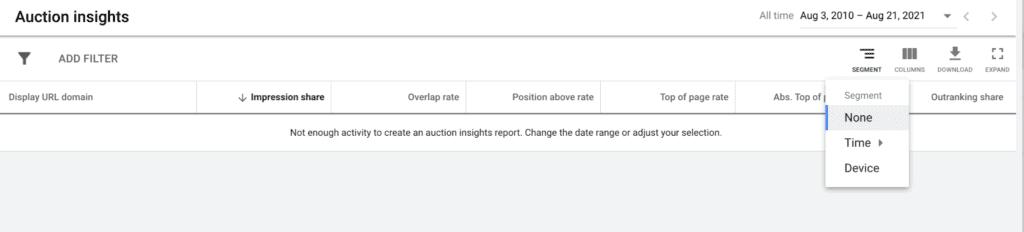
If they’re exclusively on mobile, perhaps you could invest more into targeting desktop.
Or is this a precursor to something else? Your mobile performance might be lacking and this could be a sign it needs work. Time-wise, you can see the days of the week and specific hours they have the most ad running — and the times they don’t. 🧐
Pro-tip: you can even tailor your ad schedule to take advantage of their budget and device holes.
6. The 1-inch competitor brand punch
Is another brand bidding on your brand terms? Depending on who you ask, all’s fair in love and ad bidding. But either way, you need to cover your rear and be #1 on paid search results for your brand.
In Auction Insights, you can see who runs ads based on your brand’s name and capture traffic from your competitor’s brand terms.
Enter stage left, the 1-inch competitor brand punch, a real pro-tip:
Run Remarketing List for Search Ads (RLSA) campaigns.
Adjust your bids by 100-300% on competitor’s keywords to re-target someone who clicked through to your website.
Be sure to negative brand communication terms such as “phone”, “support” and “contact”… as you don’t want their support enquiries!
The Auction report’s limiting factors
Like most reporting, Auction Insights isn’t perfect.
A few things to keep in mind:
- You’re not seeing real-time data. All reporting occurs 24 hours after impressions occur.
- Auction Insights Reports only show the impression share percentage when the keyword was active. In other words, if you had a day-parting setting overnight, it won’t report the lost impression share.
- You won’t be able to see your competitor’s match types that triggered the impressions.
- Viewing the total impression amount for a search term isn’t possible. You can review clearer information on the impressions based on your geo-targeting and day-parting settings.
- While you can see who enters the same auction as you, you’ll need another tool like PPC Ad Lab to find the other keywords competitors have active ads for.
What other questions can Auction Insights answer?
Who’s bidding on your brand
Run the report on your brand campaign or ad group(s) to see how active your competitors are on your turf. You then have a few approaches to tackle them, firstly review their ads and landing pages for each of your core brand terms.
Note what they are offering and any promise/value/guarantee made – the same goes for the landing page.
Split your brand keywords out in to granular ad groups so you can tailor ads to suit. Its common for advertisers to just lump all their brand terms together and walk away.
Alternatively, you could just outbid them. But that’s less fun. If you’re working with affiliates, Auction Insights will also show you if they’re turning up against your brand.
I have seen affiliates be sneaky and only run ads outside of office hours. Why? Because if you’re looking during the day – you don’t see them.
This is a big no-no, tell them to stop.
Other things to consider with Auction Insights:
- Identify your biggest competitor so you can focus time and energy on bettering them.
- If you have the highest impression share – are you consistently outranking the competition?
- Are all competitors selling the same – or are you missing out?
- Are the competitors appearing hinting you should be splitting or refining your ad groups?
- Do competitors with a low overall impression share, have a high impression share for a specific campaign or ad group?
- What’s the least competitive area of the market – can you move budget to it?
- Has a competitor recently left the market – what were they doing that might have left a hole for you to fill?
- Are your most important competitors running ads 247?
- And what about 7-days a week?
- A high volume keyword has poor conversion performance – why is that?
Bottom Line
King Kong got nothing on you, but your competitors (might) do.
I’d suggest you put time in your calendar to do a complete competitive analysis. Once a month should suffice on small and mid sized accounts. But consider bi-weekly for large spenders.